Overview
Quote faster, win more Jobs: The quoting partner for laser and plasma cutting.
For job shops, winning a job starts with a fast, accurate quote. Tempus Tools eliminates the tedious, error-prone manual steps of pricing metal fabrication, so you can deliver professional quotes in minutes. By connecting your quoting software directly to Xero, you achieve a seamless workflow from CAD file to customer payment, ensuring perfect data consistency and giving you real-time visibility over your job shop’s profitability.
Tempus Tools is specifically engineered for the complexities of laser cutting, plasma cutting, oxy-fuel cutting, and waterjet cutting. Our software interprets complex part geometries, manages material pricing, calculates machine time, and applies secondary process costs automatically. This level of automation means your pricing is consistent every time, boosting customer trust and your margins.
Key benefits for your fabrication business: • Quote accuracy: Eliminate costly human errors. Pricing formulas are consistent and centralised, calculating material usage, machine runtime and labour with precision. • Unmatched speed: Turn around 100-part quotes in minutes, not days. Fast response times directly translate to higher conversion rates and a healthier sales pipeline. • Total data sync with Xero: When an order is invoiced in Tempus Tools, the invoice details are instantly pushed to Xero. This creates a unified record and removes all manual double-entry. • 24/7 Sales through Web Store: Turn your website into a 24/7 sales engine with our Web Store feature, letting customers upload their own parts for instant, self-service pricing and payment.
Features engineered for fabricators: • PDF & 3D model extraction: Instantly extract 2D parts from vector PDFs and automatically unfold sheet metal components from complex 3D models (STEP, IGES), preparing them for nesting and pricing. • Tube cutting: Accurately calculate cutting and material costs for rectangular hollow sections (RHS) and circular tube parts directly from 3D files. • Secondary processes: Easily include costs for post-processing like folding, welding, powder coating, and custom operations. Set up formulas based on part weight, labour time, or flat rates. • Production documentation: Automatically generate comprehensive work orders, delivery dockets, part labels, and production checklists, ensuring the shop floor has clear, accurate instructions for every order. • Drawing Doctor®: Automatically detect and fix common issues in CAD files (DXF/DWG) that would otherwise halt have to be dealt with in a CAD program, saving time and preventing errors.
Tempus Tools helps you move from being a reactive job shop to a proactive manufacturing partner. Focus on delivering excellent customer service instead of administrative bookkeeping. Join job shops globally who trust Tempus Tools for their essential quoting and costing needs.

ToolBox + Xero
Seamless data flow: Connecting orders to Xero accounting
The Tempus Tools integration is a powerful link designed to connect your front-end sales and production data with your back-end financial records in Xero. By automating the transfer of critical financial information, we ensure your books are always up-to-date, minimising administrative burden and maximising the accuracy of your financial statements. This integration operates primarily by pushing real-time invoice data from Tempus Tools into Xero.
Key data synchronisation points
-
Customer management & contact sync: • Push from Tempus Tools to Xero: When creating an invoice in Xero, an existing Xero customer is linked to the invoice, or a new customer is created in Xero using their Tempus Tools details. • Benefit: Prevents duplicate contacts and ensures consistency across sales and accounting platforms, simplifying invoice addressing and reconciliation.
-
Sales invoice automation: • Push from Tempus Tools to Xero: When a confirmed order is converted into an invoice within Tempus Tools, a draft Sales Invoice is automatically created in Xero. This invoice includes all line items, quantities, unit prices, applied taxes (GST/VAT), customer details, and a unique reference number linking back to the job file in Tempus Tools. • Benefit: This real-time invoicing eliminates the need for manual invoice creation in Xero, accelerating the billing cycle and reducing the time-to-cash. It guarantees that the sale price agreed upon in the quoting software is the exact figure entered into the accounting system.
How the integration works
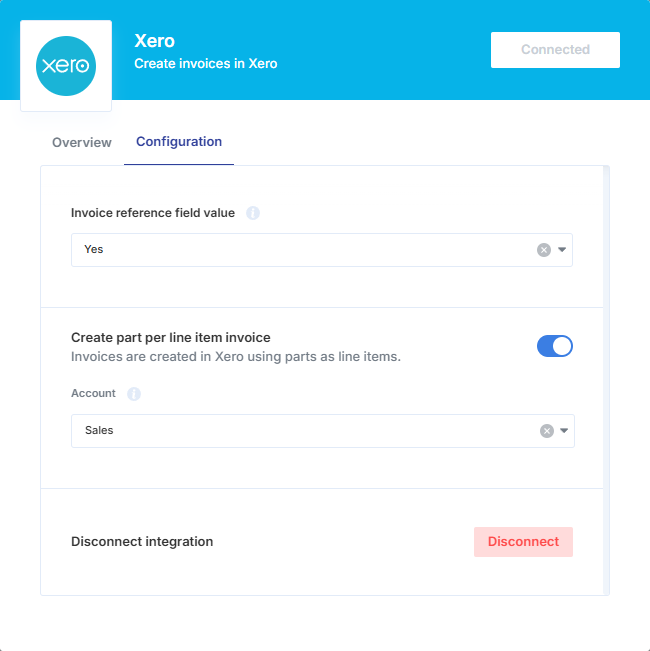
The connection uses the secure Xero API to establish a verified link between your two platforms. The setup is designed to be straightforward, allowing you to get started without any manual configuration. Optionally, quickly map some key data fields: • Account mapping: Select which Xero Revenue Account should receive the sales revenue for each line item. Or leave it as the default mapping of Xero’s standard sales revenue account. • Reference mapping: Choose to populate the reference field on the Xero invoice with either the quote number or the purchase order number from Tempus Tools, in addition to already having the invoice number synced.
By leveraging Tempus Tools and Xero together, every quote converted to a sale is instantly and accurately recorded, freeing up your bookkeeper or accountant to focus on strategic insights instead of data entry. This powerful combination of precise manufacturing pricing and world-class cloud accounting delivers clarity and control over your fabrication business’ finances. We handle the data connection so you can focus on production.
Getting started
Getting started with Tempus Tools is designed to be a quick and seamless process. The fastest and most secure way to begin your integration and link your accounts is by using the official Xero App Store button.
Step 1: Get this app The simplest way to initiate the connection is to click the “Get this app” button located on this Xero App Store listing page. This action will securely redirect you to the Tempus Tools sign-up portal, where the Xero connection process will begin automatically.
Step 2: Sign up using Xero
- Authorisation: You will be prompted to log in to your Xero account. Select the specific Xero organisation you wish to connect to.
- Grant permissions: Xero will ask you to grant Tempus Tools permission to access your basic details just for pre-filling the setup form. Review and confirm these permissions to progress.
- Redirect: You will be automatically returned to your Tempus Tools account to complete the final setup steps.
Step 3: Complete Integration Setup in Tempus Tools
Once authorised, you will be setup with a fresh Tempus Tools account, pre-filled with some default data to get you started.
To enable the invoice syncing workflow between Tempus Tools and Xero:
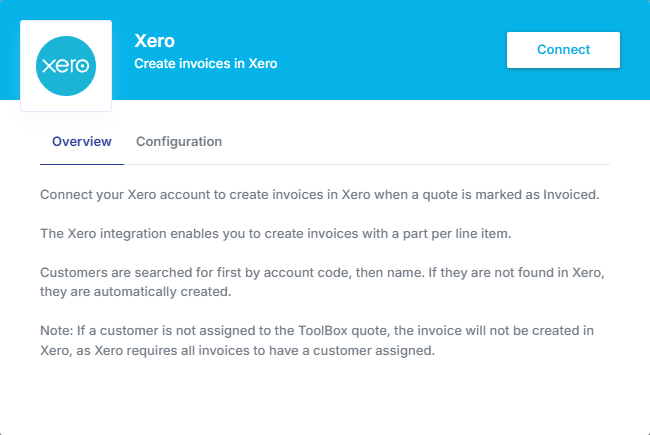
- Navigation: Go to the Settings page, and then the Integrations section. Click on the Connect Xero button to open up the Xero integration settings.
- Authorisation: Click the Connect button. You will be prompted to confirm the specific Xero organisation to connect to. Click to proceed with the existing connected organisation, or change it from here.
- Grant permissions: Xero will ask you to grant Tempus Tools permission to access and write necessary data, such as creating contacts and invoices. Review and confirm these permissions to allow the seamless data flow required for the integration to work.
- Activated: When the Xero connection popup closes, your integration is established. Every time a Tempus Tools quote is marked as Invoiced, the integration will be triggered.
Optional enhancements • Map account code: Select which Xero Revenue Account should receive the sales revenue for each line item. Or leave it as the default mapping of Xero’s standard sales revenue account. • Map additional reference number: Choose to populate the reference field on the Xero invoice with either the quote number or the purchase order number from Tempus Tools, in addition to already having the invoice number synced.
Need help? We’ve got you covered.
We understand that connecting critical business systems needs to be done right. Our dedicated support team is here to ensure a smooth transition. • Technical support: We offer robust online documentation and a responsive email support system to answer your technical and setup questions quickly. • Training and onboarding: Every new customer receives access to guided tutorials and onboarding resources to ensure your team is confident with the quoting process and the Xero sync.