You’re on the Ireland site
Select a region

Scott's Add-ins

By Scott's Add-ins
4.98 out of 5 stars
Free 15 day trial available
Get this app
Build real-time reports without leaving Excel. Scott’s Add-ins automates the sync of data from Xero to Excel. Quickly build flexible & bespoke reports for clients and industry. Consolidate multiple entities into one workbook. Sync Xero data to your Excel templates.
Rated
5.0
out of 5
Reviewed by
58
Xero users
Try this app
Free 15 day
trial available
Listed for
7 years
June 2019

Overview

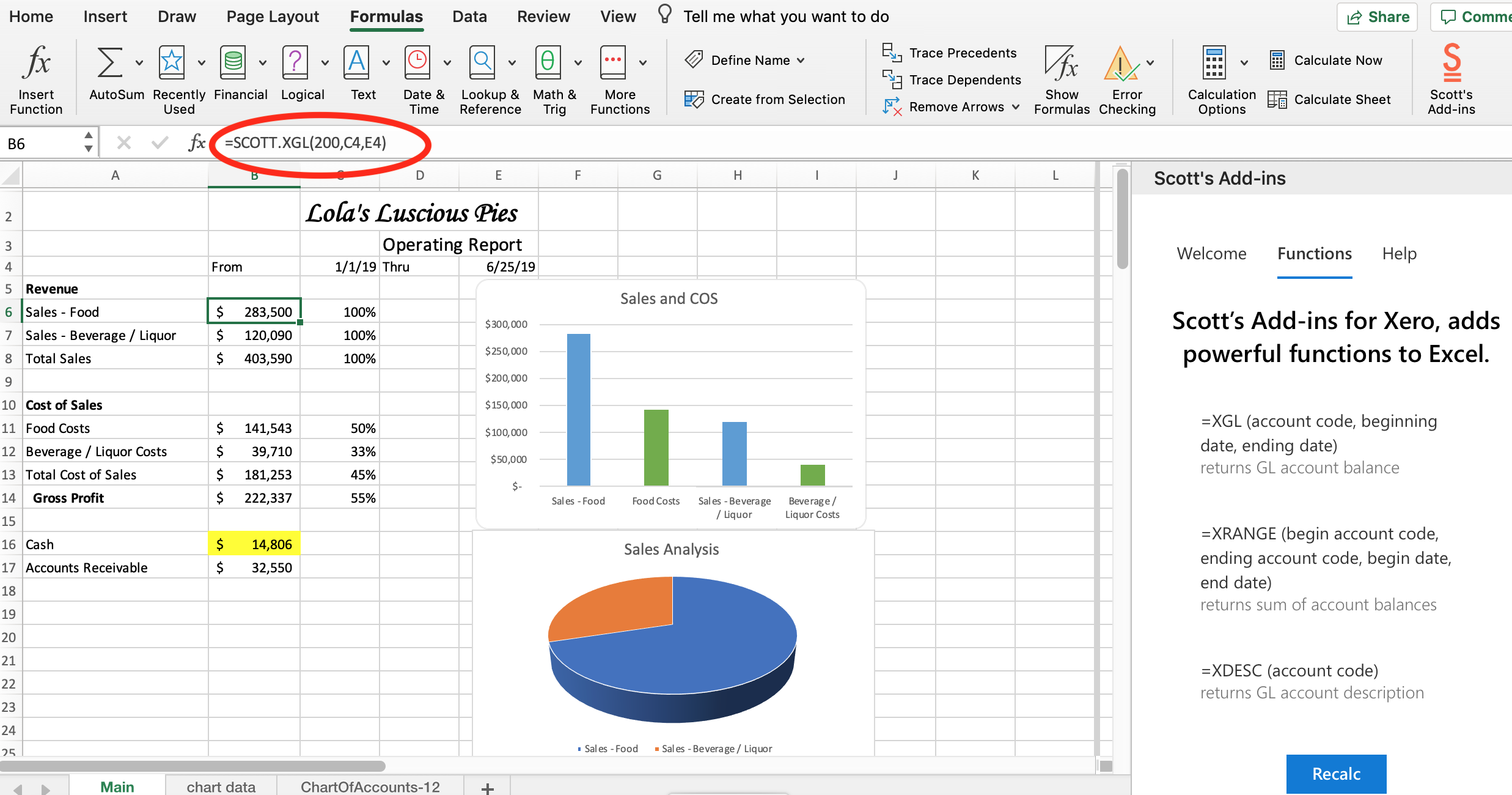
Scott’s add-in for Xero, gives you powerful, new Excel functions that allow you to leverage your Xero data. Build real-time reports without leaving Excel. Scott's Add-ins automates the sync of data from Xero to Excel.

  • Quickly build flexible & bespoke reports for clients and stakeholders
  • Build bespoke financial, customer, and vendor reports.
  • Consolidate groups & multiple entities into one workbook
  • Sync Xero data into your existing Excel templates
  • Forecast future cash flows

Save hours of time each month, and reduce errors. Use your Excel templates without building new ones. Recalc your workbook with fresh Xero data in seconds.

Get started with Scott's Add-ins in less than ten minutes. No training is required. If you know how to use Excel, you know how to use Scott's.

For an even faster start, begin with one of our downloadable Excel templates. These templates are contributed by our users, and are free!

Sales Analysis, Purchase Analysis, Proformas, Operating Reports, Cash Flow, Tracking Category comparisons, budgets, and multi-org consolidations, are just some of what you can do.

Here’s a list of the custom Excel functions:

= SCOTT.CHART. Returns the chart of accounts.

=SCOTT.DESC Returns the account description for a given account code.

=SCOTT.GL Returns the sum of all transactions for a user specified date range.

=SCOTT.XGLTRX Returns the lines of multiple bills filtered between two dates and other filtering information.

=SCOTT.RANGE Returns the sum for a range of account codes.

=SCOTT.GLMULTI Returns the sum of multiple gl accounts and ranges.

=SCOTT.XINVOICE Returns the lines of multiple invoices filtered between two dates and other filtering information.

=SCOTT.XBIL Returns the lines of multiple bills filtered between two dates and other filtering information.

=SCOTT.XINVOICE_SUM Returns the sum of multiple invoices filtered between two dates and other filtering information.

=SCOTT.XBILL_SUM Returns the sum of multiple bills filtered between two dates and other filtering information.

=SCOTT.XBUDGET Returns the Xero budget

=SCOTT.XTRACK Returns the sum of an account code for a Tracking Category / Option.

=SCOTT.XTRACKR Returns the sum for a range of account codes for a Tracking Category / Option.

=SCOTT. XTRACKM Returns the sum of account transactions that have BOTH Xero Tracking Categories assigned.

As an example, the syntax for =SCOTT.GL

=SCOTT.GL (Organisation ID, Account Code, Start Date, End Date)
Scott's Add-ins
Play Video
, opens in a dialog

Scott's Add-ins + Xero

Scott's add-in for Xero, easily connects your Xero data to your Excel spreadsheet. You can connect one or multiple Xero organisations to an Excel workbook.

Simply download the add-in from the Microsoft store, connect your spreadsheet to one or more Xero organisations, and you are on your way to creating beautiful financial art.

Reviews & ratings

5.0 out of 5 stars
58 Reviews

Sort and filter

Rating
Sort

Most recent reviews

JC
Jaime Campbell
Posted
5 out of 5 stars

I bring sophisticated reporting to my clients in mere seconds!

My CFO team and I have been in love with Scott's Add-Ins from the day we tested it out. * We are able to produce reports that Xero alone can't produce, such as a Budget vs. Actual with Balance Sheet accounts... * We quickly consolidate 3 related entities into a single financial statement, including eliminating appropriate accounts - the time to complete this client's monthly close has been cut by 50% * I have combined several of Scott's functions with spill functions such as FILTER, DROP, MAP, and GROUPBY and a simple macro to produce 21 PDF filtered Income Statement reports, one for each tracking option in one of our tracking categories, with a click of a button. * Support is phenomenal. First of all, the video resources are right to the point and 9 times out of 10 if I have a question, the answer is at my fingertips. But on the occasion that I have a question,. a receive an accurate, clear, and timely response from Scott. * We have the Pro subscription level, which means unlimited users! My whole team can access this! In short, my team and I look GOOD for clients and seriously minimize our time doing so once we've set up a report. Scott, thank you for this fantastic product.
LB
Luke Brown
Posted
5 out of 5 stars

The thing you've waited for your whole life

Absolute game-changer for anyone hitting the limits of Xero in terms of doing elegant data pulls. Has become a cornerstone of our internal management reporting package. AWESOME!
One person found this review helpful.

Response from Scott's Add-ins

Thank you Luke for your glowing review! Glad to hear our product is making a difference for you.
BA
Brad Accounts
Posted
5 out of 5 stars

Simple and effective

I just needed a simple app to extract raw data into Excel for existing reporting and reconciliation purposes. This one is excellent, simple and effective. Even someone with minor experience with formulas would pick this up quickly. Also, the support is first rate. Had an issue logging in and after some back and forth emails, Scott was able to isolate the issue and fix it. Highly recommend!

Response from Scott's Add-ins

Thank you Brad for your kind review. We are pleased to hear that our product is making a difference for you.

Additional info

Shared data

Xero
Scott's Add-ins
Budgetsshared from Xero to Scott's Add-ins
PayItemsshared from Xero to Scott's Add-ins
Accountsshared from Xero to Scott's Add-ins
Tracking Categoriesshared from Xero to Scott's Add-ins
Tax Ratesshared from Xero to Scott's Add-ins
Reportsshared from Xero to Scott's Add-ins
Receiptsshared from Xero to Scott's Add-ins
Manual Journalsshared from Xero to Scott's Add-ins
Journalsshared from Xero to Scott's Add-ins
Itemsshared from Xero to Scott's Add-ins
Invoicesshared from Xero to Scott's Add-ins
Credit Notesshared from Xero to Scott's Add-ins
Contactsshared from Xero to Scott's Add-ins

Functions

Reporting and forecastingAccountant tools

Industries

Not for profitProfessional servicesAccounting

App details

By Scott's Add-ins
Added in 2019

Countries

Australia, Canada, Global, Hong Kong, Ireland, Malaysia, New Zealand, Philippines, Singapore, South Africa, United Kingdom, United States

Languages

English

Support

Contact supporthelp@scottsaddins.com

Follow

LinkedIn

15 day free trial available

Although Xero reviews each app in the Xero App Store, we can’t give any guarantees. It’s up to you to assess the performance, quality and suitability of any app before going ahead.