

Overview
Turn compliance into paid advisory
TaxFitness helps accounting firms expand services, grow advisory revenue, and deliver more value to clients without adding complexity or unpaid work.
It provides a complete advisory system that integrates tax planning, Top 20% business benchmarking, and business advisory into everyday practice.
⭐ 5.0 out of 5 rating Reviewed by Xero users Listed since September 2022 🆓 14-day free trial
What TaxFitness Does
Most firms have the insight. What they lack is a simple, repeatable way to turn it into paid advisory.
TaxFitness gives you the systems, reports, and frameworks to deliver advisory on purpose, not as an afterthought.
Key benefits
- Generate new advisory revenue from existing clients
- Produce professional advisory reports in minutes
- Move beyond compliance to proactive advice
- Strengthen client relationships and retention
- Deliver measurable outcomes clients understand and value
Core features
Advisory reports: Tax planning, benchmarking, and business advisory, client-ready in minutes
Tax planning engine: Identify relevant Australian tax strategies quickly and confidently
Strategy libraries:
- 250+ Australian tax strategies
- 350+ business advisory strategies
- 400+ Top 20% industry benchmarks
Customisable reports: Fully branded and tailored per client
Training & support
- 5 hours of structured onboarding training via Zoom
- Access to webinars, guides, and practical resources
Pricing
- Annual subscription: $1,320 (incl. GST)
- Unlimited users, clients, and reports included.
Who it's for
Accounting practices ready to turn compliance work into structured, profitable advisory.
Tax Fitness + Xero
- Seamless integration with Xero, MYOB, and QuickBooks
- Import client groups and financial data
- Eliminate manual data entry and double handling
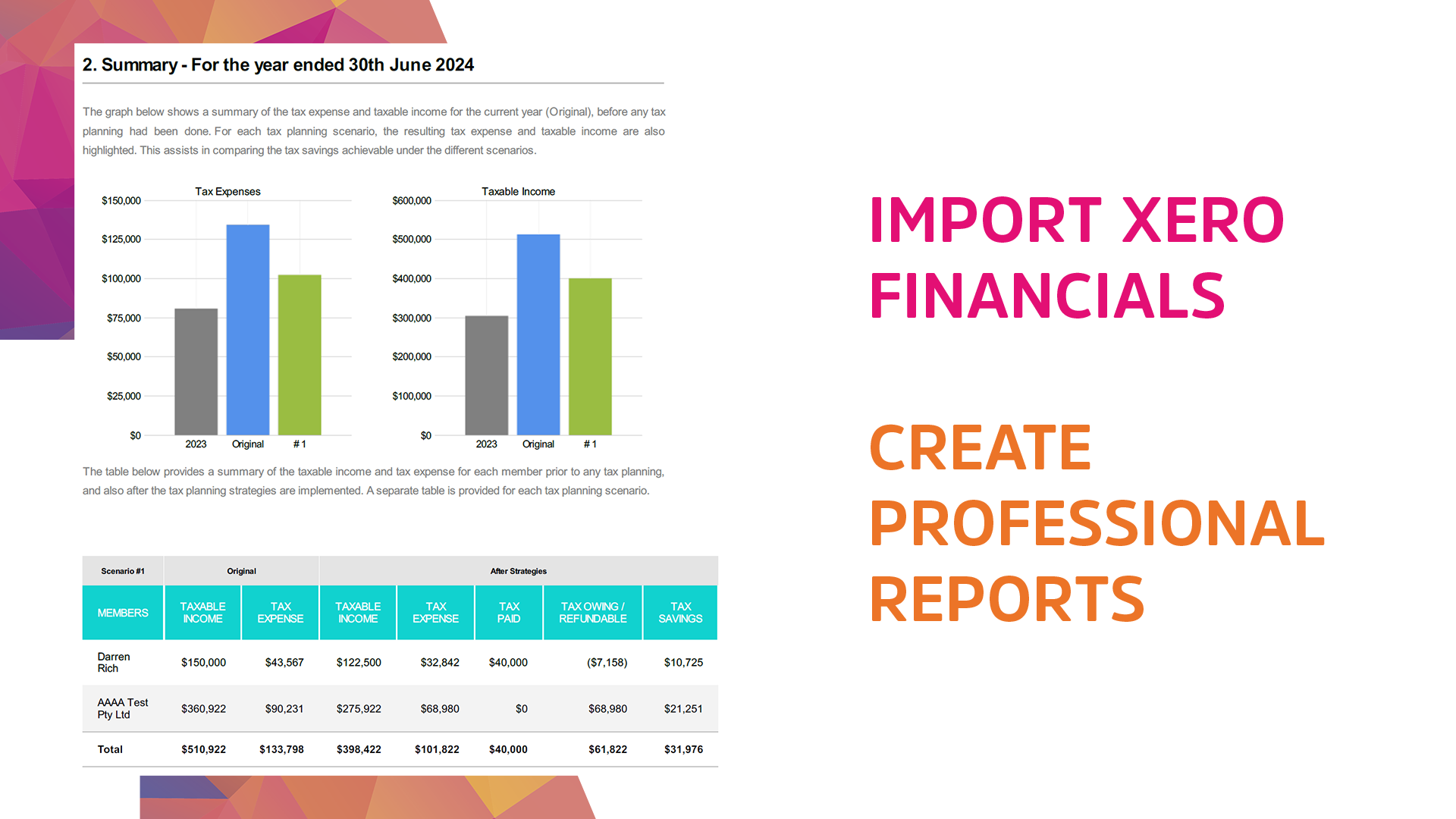
TaxFitness integrates directly with Xero to streamline tax planning by importing live client financial data, profit & loss, balance sheets, and entity structures directly from Xero.
This integration eliminates manual data entry, allowing accountants to generate professional tax planning, top 20% business benchmarking and business advisory reports.
Seamless Data Import:
Users can securely link client files from Xero and import data, removing the need for manual exporting and reformatting.
Practice Management Integration:
The connection allows for syncing client lists from Xero Practice Manager (XPM), TaxFitness User Manual notes. Usage for Advisory: The imported data is immediately used for tax planning strategies, benchmarking (top 20% business), and business valuations.
Setup Process:
Users can connect Xero to TaxFitness by signing up, navigating to "My Clients," and selecting the "Sync Xero Clients" button, Tax Fitness Xero Integration Reviews & Features notes.
Multi-Entity Handling:
The system supports importing data for complex structures.
Access Control:
Strategies added are only visible to the user's specific practice.
This integration enables accountants to proactively offer tax planning and advisory services rather than just focusing on compliance.
Getting started
3 easy steps
- Sign up for a 14-day free trial
- From the left-hand menu, select My clients and click the pink Sync Xero clients button.
- Select a client member and click the pink Import your financials from Xero button.


Reviews & ratings
Sort and filter
Most recent reviews
Makes tax planning so much easier and applicable to any business
Response from Tax Fitness
Tax Planning Software
Response from Tax Fitness