

Get a 3-month trial of Revolut Business and connect to Xero to save time on bookkeeping. Sync transactions, import and export bills, and track expenses with receipts, tax rates, and categories attached. Accept payments into your Business account, with invoices automatically marked as paid in Xero.
Rated
4.0
out of 5Reviewed by
8
Xero usersTry this app
Free trial
availableKey functions
Bills and expenses
Accountant toolsOverview
Revolut Business is the all-in-one account built to help you run your business from one app, on both web and mobile.
Whether you're a startup, scale-up, or enterprise, go beyond business as usual with a whole suite of tools to make and take payments, control company spend, and empower your team.
Pay and get paid in 25+ currencies:
- Set up as many currency accounts as you need to run your business globally
- Send transfers across 150+ countries, with no-fee monthly allowances
- Accept payments online or in person with competitive rates and next-day settlement
- Control your outgoing payments with custom approvals, spending limits, and real-time tracking
- Pay up to 1,000 recipients at once across multiple currencies
Manage your spend effortlessly:
- Issue virtual and physical cards to your whole team, with custom spending limits built in
- Track your company's card spend in real-time, and gain insights into your cashflow trends with analytics
- Organise spend by linking cards to specific accounts
- Freeze cards instantly for added security when you need it
- Save your finance team hours every week with in-app expense management tools
And there’s more…
- Easily integrate with Xero to sync bank feeds, export bills, and auto-reconcile expenses
- Enjoy rewards, offers, and discounts from leading partners
- Count on advanced account security with our in-house fraud detection technology

Play Video, opens in a dialog
Revolut Business + Xero
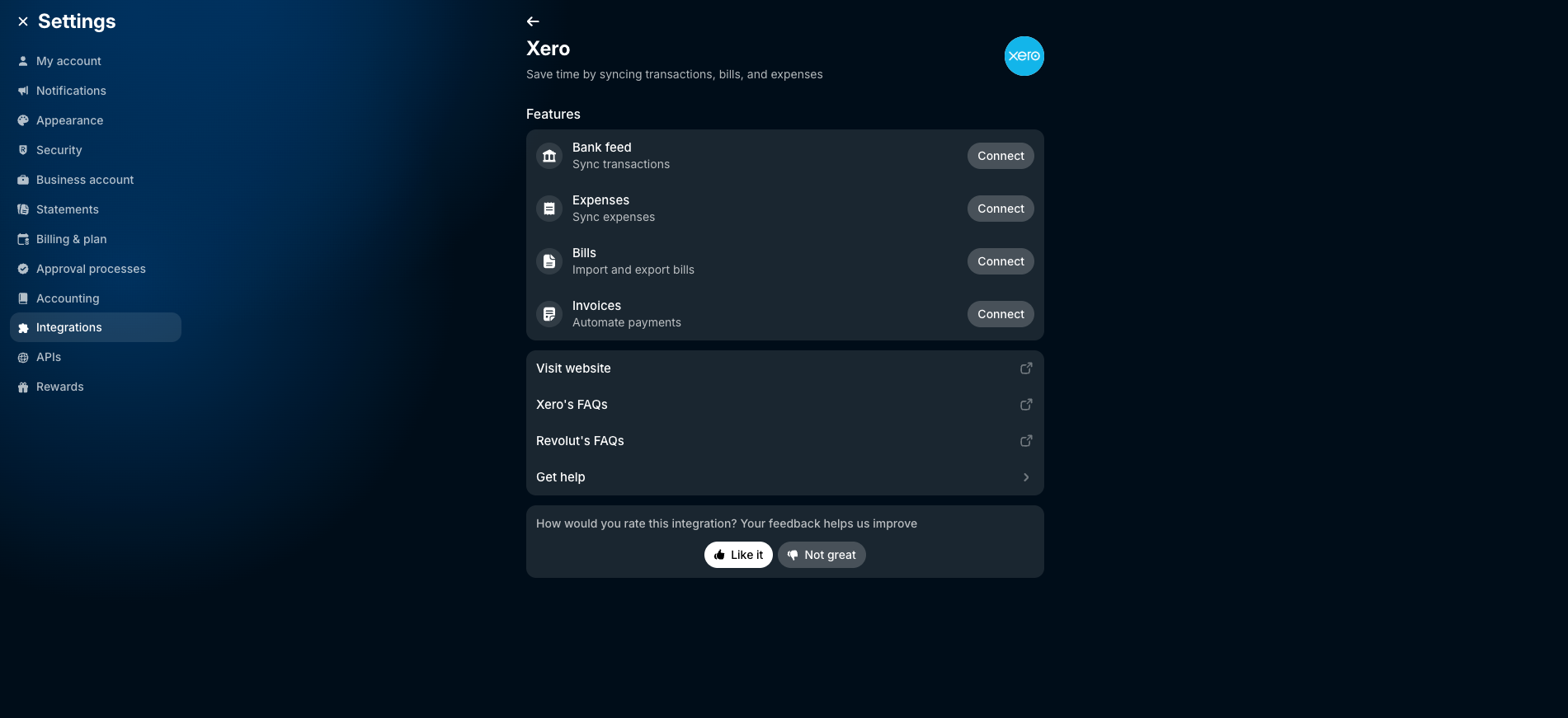
Save time and keep your books accurate by syncing your Revolut Business transactions, bills, expenses, and invoices directly into your Xero account.
- Automatically export your expenses, receipts, tax rates, and categories to Xero, and close the books in record time each month.
- Pull bills into your Revolut Business account from Xero automatically, or upload them in a few clicks. We'll extract all the key data for you. Just review the details and confirm your payments, with all transaction details syncing between your apps.
- Make it easy for your customers to pay invoices instantly via card, Revolut Pay, Apple Pay, Google Pay, or Pay by Bank. We’ll automatically mark the invoice as paid in Xero and reconcile the transaction for you to save you time (requires setting up a Revolut Business Merchant account).
Getting started
To set up the Xero integration:
- Go to 'Settings' in the Revolut Business app
- Go to 'Integrations' → ‘Accounting’
- Select 'Add' and choose 'Xero'

Reviews & ratings
8 Reviews
Sort and filter
Rating
Sort
Most recent reviews
YA
Yasmina Al-Rawi
Posted
connection is smooth, even with multiple currencies. Login checks feel airtight so I have peace of mind
MH
Mark Henderson
Posted
connection is easy and I dont have to mess about with spreadsheets honestly very helpful for business
HR
Hasan Rasheede
Posted
Works for me
bank feed sync works great and saves a lot of time
One person found this review helpful.
Additional info
Functions
Bills and expensesAccountant toolsIndustries
Professional servicesAccountingApp details
By Revolut Business
Countries
Australia, Ireland, New Zealand, Singapore, United Kingdom, United StatesLanguages
Bulgarian, Croatian, Danish, Dutch, English, French, German, Greek, Hungarian, Italian, Latvian, Lithuanian, Polish, Portuguese, Romanian, Slovenian, Spanish, SwedishSupport
Setup walkthroughContact supportbusiness@revolut.comFollow
TwitterFacebookInstagramLinkedInTry Revolut Business for free
Although Xero reviews each app in the Xero App Store, we can’t give any guarantees. It’s up to you to assess the performance, quality and suitability of any app before going ahead.